

For years, developers have treated analytics as something external — a tool marketers use while developers stay focused on applications. But what if analytics data could become a first-class citizen in your .NET applications? That’s the idea behind the new Piwik PRO .NET SDK — a developer-friendly way to track events, query analytics using LINQ-style syntax, and integrate privacy-first analytics directly into modern .NET apps. At CodeArt we helped build the SDK and are now launching open source sample code, including a fully working Blazor sample, as well as good SDK documentation.
Privacy-First Analytics Matters More Than Ever
Over the past few years, analytics has gone through a major shift.
Where analytics tools once focused almost exclusively on tracking as much data as possible, today the conversation increasingly revolves around privacy, consent, and responsible data usage. Especially in Europe, where regulations like GDPR have fundamentally changed how organizations collect and process user data.
At CodeArt we’ve increasingly focused on privacy-first analytics solutions — tools that still provide meaningful insights while respecting user privacy and regulatory requirements.
One of the most compelling platforms in this space is Piwik PRO.
Piwik PRO provides a full analytics platform designed for organizations that need strong compliance and data governance. This includes flexible hosting options, strong privacy controls, and deep integration with consent management platforms.
That last part became even more interesting when Cookie Information merged with Piwik PRO.
Cookie Information already helps thousands of websites manage consent and privacy compliance, making it easier for organizations to operate within even the strictest EU regulatory environments. With Piwik PRO now part of the same ecosystem, it becomes possible to combine consent management and privacy-focused analytics in a much more integrated way.
But powerful analytics platforms also need strong developer tooling.
That’s where the Piwik PRO .NET SDK comes in.
The Piwik PRO .NET SDK
The SDK is available on NuGet:
https://www.nuget.org/packages/PiwikPRO
The PiwikPRO package acts as a wrapper package that brings together several SDK components designed to make it easier to work with Piwik PRO from modern .NET applications.
The SDK builds on top of the official Piwik PRO Analytics API:
Instead of manually constructing HTTP requests and parsing raw API responses, the SDK provides a clean .NET abstraction layer with strongly typed models and fluent query patterns.
The SDK consists of several packages:
PiwikPRO.Core
The Core package contains shared infrastructure used across the SDK, including authentication handling, HTTP communication, and common abstractions.
This layer essentially acts as the foundation for communicating with the Piwik PRO APIs.
PiwikPRO.Tracking
The Tracking package provides an easy way to send tracking data to Piwik PRO directly from .NET applications.
This includes tracking events such as:
- Page views
- Custom events
- Downloads
- Goals and conversions
One particularly useful feature is that the SDK supports both server-side tracking and client-side tracking scenarios.
Developers can either send tracking events directly from .NET code, or generate the JavaScript tracking code required for client-side tracking.
This makes it easy to integrate Piwik PRO into a wide range of application architectures.
The tracking API is documented in detail in the samples repository:
https://github.com/CodeArtDK/piwikpro-dotnet-samples/blob/main/docs/tracking-api.md
PiwikPRO.Analytics
The Analytics package allows .NET applications to query analytics data from Piwik PRO using a fluent, developer-friendly API.
Rather than dealing with low-level reporting endpoints, developers can work with LINQ-style queries that feel natural inside the .NET ecosystem.
You can see the documentation for how to query analytics data here: https://github.com/CodeArtDK/piwikpro-dotnet-samples/blob/main/docs/analytics-queries.md
For example, querying analytics data can look something like this:
var query = analyticsService.CreateQuery()
    .AddDimensions(Dimensions.Page.PageUrl, Dimensions.Device.Browser)
    .AddMetrics(Metrics.Sessions.TotalSessions, Metrics.Sessions.BounceRate)
    .SetDateRange(startDate, endDate)
    .WhereContains(Dimensions.Page.PageUrl, "/product")
    .OrderByDescending(Metrics.Sessions.TotalSessions)
    .Paginate(page: 1, pageSize: 50);

var response = await analyticsService.QueryAsync(query.Build());
Under the hood, the SDK translates these queries into requests against the Piwik PRO analytics API, while giving developers a strongly typed and composable query experience.
This makes it significantly easier to build:
- dashboards
- reports
- analytics-powered features
- automated insights
directly inside .NET applications.
A Blazor Sample Application
To demonstrate how the SDK can be used in practice, we’ve also released a fully working Blazor WebAssembly sample application.
The sample acts as a lightweight analytics dashboard that queries Piwik PRO data through the SDK and renders it using familiar .NET UI components.
You can explore the live demo here:
https://piwikprosdk.codeart.dk/
To use it you need a Piwik PRO account, you can get a trial here.
The demo shows how the SDK can be used to power dashboards displaying metrics such as:
- Sessions
- Page views
- Conversions
- Traffic sources
- Trends over time
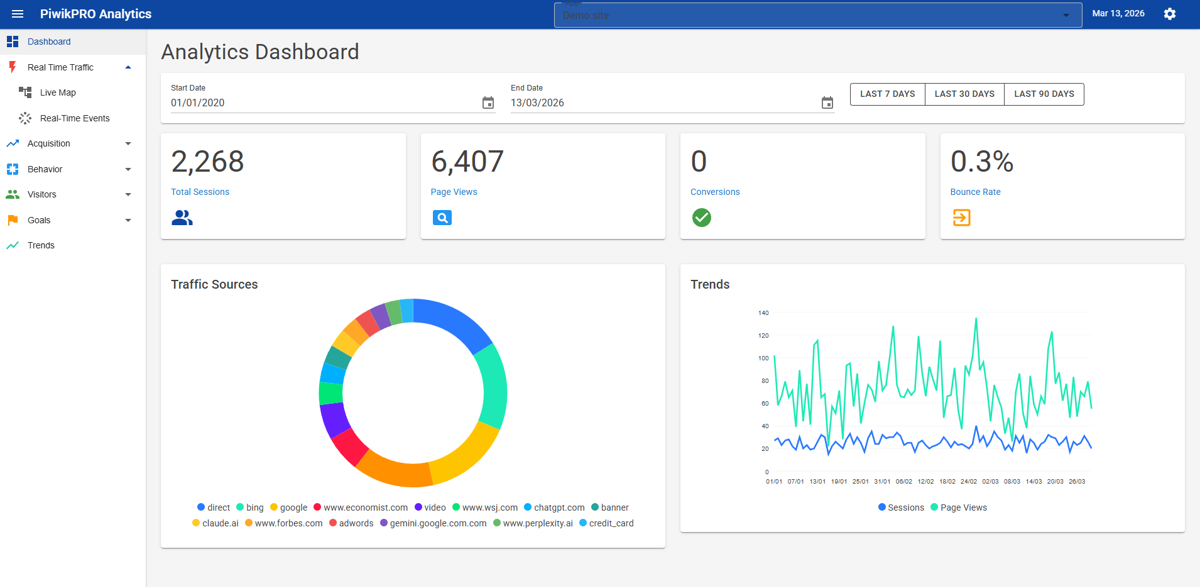
Because the dashboard is implemented in Blazor WebAssembly, the entire UI is built using .NET — demonstrating how analytics data can become a natural part of modern .NET applications.
The full source code for the samples and documentation is available here:
https://github.com/CodeArtDK/piwikpro-dotnet-samples
A Foundation for Analytics-Powered Applications
While the SDK already makes it easier to build analytics dashboards and reporting tools, it also opens the door to something more interesting.
Because analytics data is now easily accessible from .NET code, it becomes possible to integrate it with other systems — including content management systems, automation workflows, and AI tools.
At CodeArt we’ve already started exploring this direction with Opalytics, an experiment that combines Piwik PRO analytics with AI-powered insights directly in Optimizely Opal AI, ChatGPT or whereever you need it.
Instead of just looking at dashboards, analytics data can be analyzed, summarized, and transformed into actionable insights automatically.
You can read more about that here:
And explore the concept further at:
What’s Next
The SDK and sample applications provide a strong foundation for bringing analytics closer to the .NET developer ecosystem.
And this is only the beginning.
In upcoming posts we’ll explore topics such as:
- Querying analytics data using LINQ
- Building analytics dashboards with Blazor
- Integrating analytics into CMS platforms like Optimizely
- Combining analytics with AI to generate insights
If you’re interested in exploring the SDK, you can find the samples and documentation here:
https://github.com/CodeArtDK/piwikpro-dotnet-samples