

Optimizely export packages have quietly become more complex. Inline (nested) blocks in CMS 12 and PaaS solutions weren’t always displayed clearly, and with SaaS CMS—and soon CMS 13—Visual Builder introduces compositions, layout hierarchies, and display templates on top. This update to the Optimizely Package Explorer improves support across these scenarios, making it far easier to inspect and understand what’s actually inside your packages.
In the previous release, we introduced major usability improvements and structural inspection enhancements. This update goes deeper—focusing specifically on modern export scenarios across CMS 12, SaaS CMS, and the upcoming CMS 13.
Export packages used to be relatively predictable.
You had content types.
You had properties.
You had blocks referenced in known ways.
Then inline (nested) blocks became more common—especially in CMS 12 and PaaS solutions. While powerful, they weren’t always easy to interpret inside exported packages. Instead of clearly structured content, you’d often see long serialized values where structure was implied rather than visible.
Now add SaaS CMS—and soon CMS 13—to the picture.
With Visual Builder, content is no longer just properties and references. It’s:
- Compositions
- Sections, rows, and columns
- Nested elements
- Inline blocks inside structured layouts
- Display templates defining how elements behave
The flexibility is fantastic for editors.
But inside an export package, that flexibility translates into layered JSON structures and embedded elements that aren’t always obvious at first glance.
If you’re debugging, validating exports, preparing migrations, or just trying to understand what was actually built—you need clarity, not guesswork.
That’s what this update focuses on.
Inline Blocks — Now Properly Displayed
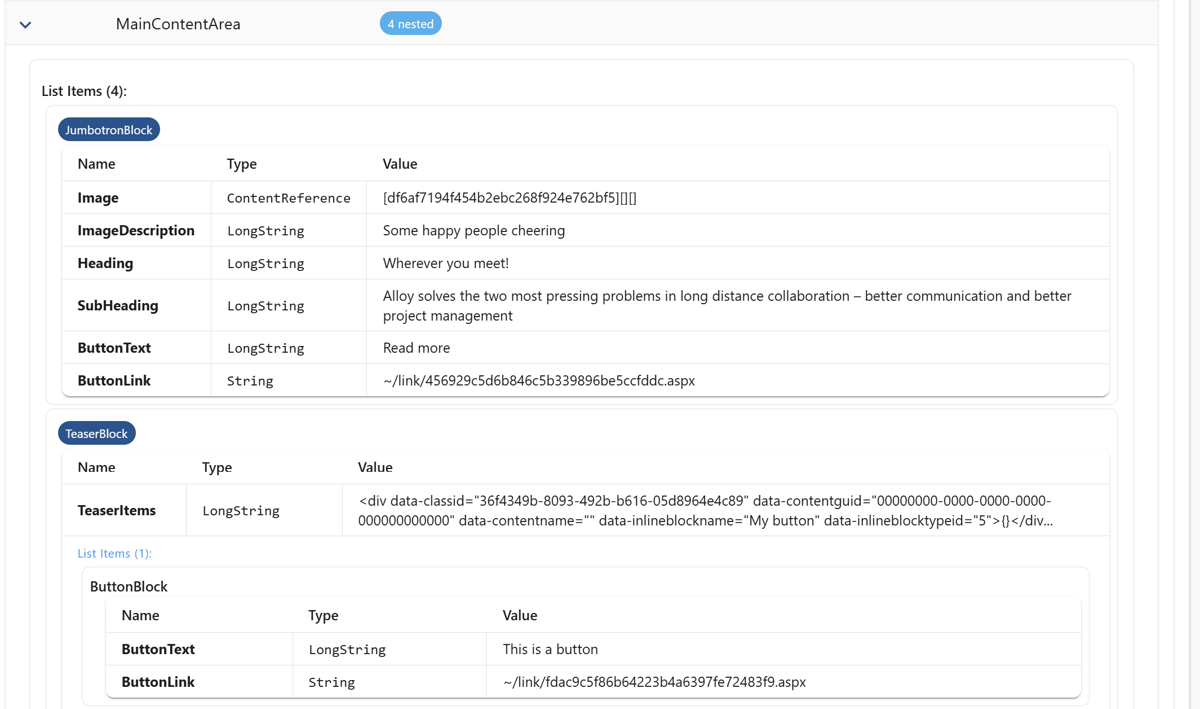
Inline (nested) blocks have been around for a while—especially in CMS 12 and PaaS-based solutions. They’re powerful because editors can build rich, structured content directly inside properties like ContentArea.
The problem?
Inside export packages, those inline blocks weren’t always easy to inspect.
Instead of clearly structured nested items, you often ended up looking at serialized values where the actual hierarchy was hidden inside markup or embedded JSON. Technically correct—but not exactly readable.
This release improves how inline blocks are parsed and presented.
Inline blocks are now:
- Extracted and displayed as proper nested items
- Shown in a clear hierarchical structure
- Easier to expand, inspect, and validate
- Separated visually from surrounding property data
You can now see what’s actually inside a content area—without reverse-engineering it in your head.
Compositions & Layout — Understanding Visual Builder Structures
With Optimizely SaaS—and soon CMS 13—Visual Builder introduces a more compositional approach to content.
Instead of just properties and referenced blocks, you now have structured layouts consisting of:
- Sections
- Rows
- Columns
- Components
- Nested elements inside those components
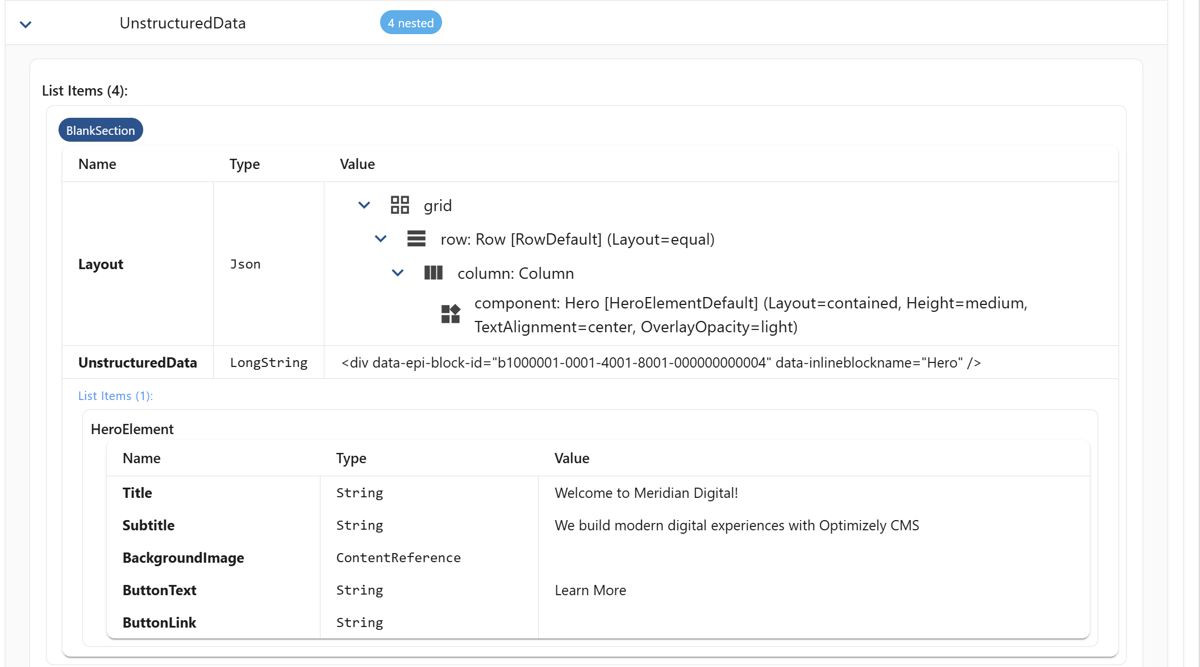
In export packages, this structure is typically represented as layout JSON. Powerful, yes—but not always immediately readable.
This update improves how those layout structures are interpreted and displayed inside the Package Explorer.
Instead of looking at raw layout definitions, you can now navigate:
- The overall composition structure
- Individual sections and their purpose
- Nested rows and columns
- The components placed within each layout area
The hierarchy becomes visible instead of implied.

Drilling Into Individual Elements
It’s not just about seeing the layout structure.
You can also drill into individual elements inside a composition and inspect their actual data—titles, subtitles, background settings, links, and other element properties.
This is especially useful when:
- Debugging unexpected layout behavior
- Validating what editors configured
- Preparing migrations
- Rebuilding layouts in another environment
Instead of guessing how a component was configured, you can inspect the element data directly.
A New and Improved Display Templates View
Visual Builder doesn’t just define structure. It also defines behavior.
Display templates control how elements are rendered, what variations exist, and how components behave in different contexts. In SaaS CMS—and moving forward with CMS 13—this becomes an important part of understanding a solution.
Previously, display template data was accessible—but not always easy to overview.
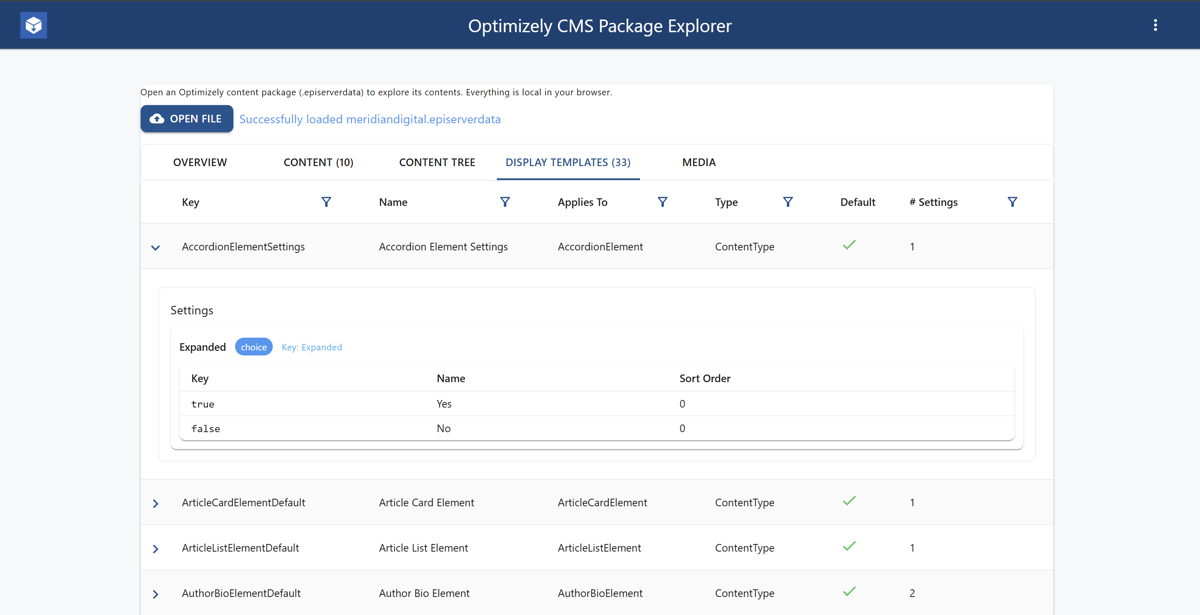
This release introduces a clearer, dedicated view for display templates.
Instead of digging through raw definitions, you now get:
- A structured overview of available templates
- Clear visibility into element settings and defaults
- A better understanding of how templates relate to content types
- A more focused inspection experience overall
For developers and architects, this matters when:
- Validating how elements are configured
- Debugging rendering inconsistencies
- Understanding how a SaaS implementation is structured
- Preparing migrations or refactoring efforts
It brings visibility to an area that’s increasingly central in modern Optimizely setups.
What this ultimately means is simple: export packages are no longer something you have to mentally reconstruct.
When inline blocks are clearly nested, compositions are structured hierarchically, and display templates are visible in context, the package starts to reflect the actual architecture of the solution.
You can see how a page was composed.
You can see how elements were configured.
You can see how structure and behavior connect.
That’s valuable when debugging a layout that doesn’t behave as expected. It’s valuable when validating a SaaS export before a migration. And it’s especially valuable when reviewing a solution built by another team and trying to understand the architectural decisions behind it.
Modern Optimizely setups are more flexible than ever. The tooling used to inspect them should keep up.
This version of the Package Explorer is a step in that direction.
Try It Out
If you’re working with CMS 12, PaaS, SaaS CMS, or preparing for CMS 13, give it a spin:
👉 Try the live demo: https://codeartdk.github.io/CodeArt.Optimizely.PackageExplorer/
⭐ Star the project on GitHub: https://github.com/CodeArtDK/CodeArt.Optimizely.PackageExplorer
📖 Read the previous update: https://www.codeart.dk/blog/2025/11/optimizely-package-explorer-now-with-extra-superpowers/
It’s open source, runs entirely in the browser, and continues to evolve alongside the platform.