
Analytics has spent the last decade living in another tab — and what's in that tab usually isn't the full story. Between consent requirements, browser restrictions, and the gap between "what marketing wants to know" and "what the tracking script actually captures", most analytics setups end up describing about half the picture. The new Piwik PRO Connector for Optimizely CMS is now live on NuGet, dual-targeted for both CMS 12 (.NET 8) and CMS 13 (.NET 10) from the exact same package — and one of its quieter superpowers is making it dramatically easier to get rich Optimizely context (content type, language, audience membership, block impressions, plus whichever custom dimensions matter for your site) into Piwik PRO, so the dashboards finally know what they're looking at. Editors get analytics next to their content. Developers get a tracking API that doesn't require writing JavaScript by hand. And the privacy-first part comes for free, courtesy of Piwik PRO.
The "open another tab" problem
If you've worked with Optimizely for any length of time, you know the editorial workflow tends to look like this:
- Open Optimizely.
- Edit some lovely content.
- Publish.
- Open another browser tab. (Possibly two.)
- Try to remember the URL of the analytics dashboard.
- Try to remember the password.
- Filter by URL. Cross-reference. Frown thoughtfully.
- Go back to the CMS to update the headline you suspect is the problem.
- Repeat in 24 hours.
It works. But it's also the digital equivalent of cooking dinner in one room and tasting it in another — technically possible, mostly silly. Editors end up flying blind on what's working, and developers end up answering "can you just pull the numbers for this page?" in Slack at uncomfortable hours.
So we built a connector that brings the analytics into the room where the content actually lives.
What the connector actually does
PiwikPRO.Optimizely.Connector is now available on the Optimizely NuGet feed. It's the CMS-side companion to the Piwik PRO .NET SDK we announced back in March — same foundations, but now baked into Optimizely's editorial UI.
Out of the box, you get:
- Automatic tracking script injection — the Piwik PRO container script gets dropped into every front-end page. Edit and preview modes are excluded automatically, because nobody needs to skew their analytics with their own QA clicks.
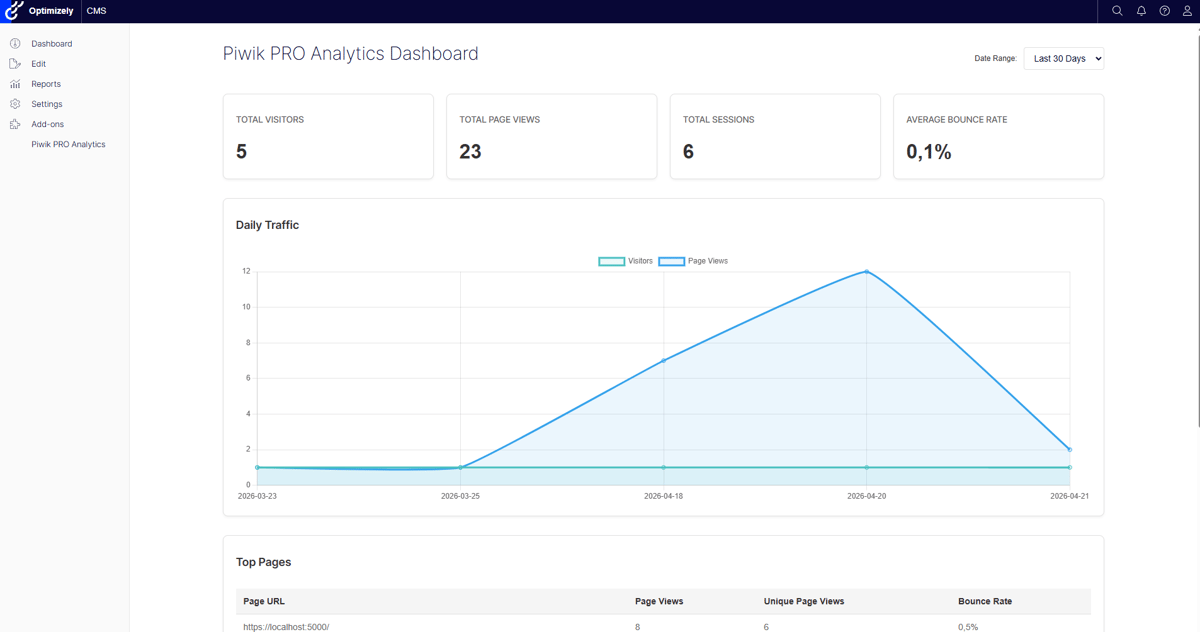
- A full analytics dashboard inside the CMS — eight pages (Overview, Sessions, Live Map, Acquisition, Behavior, Visitors, Goals, Settings), date-range selector that remembers your preference per user, the works.
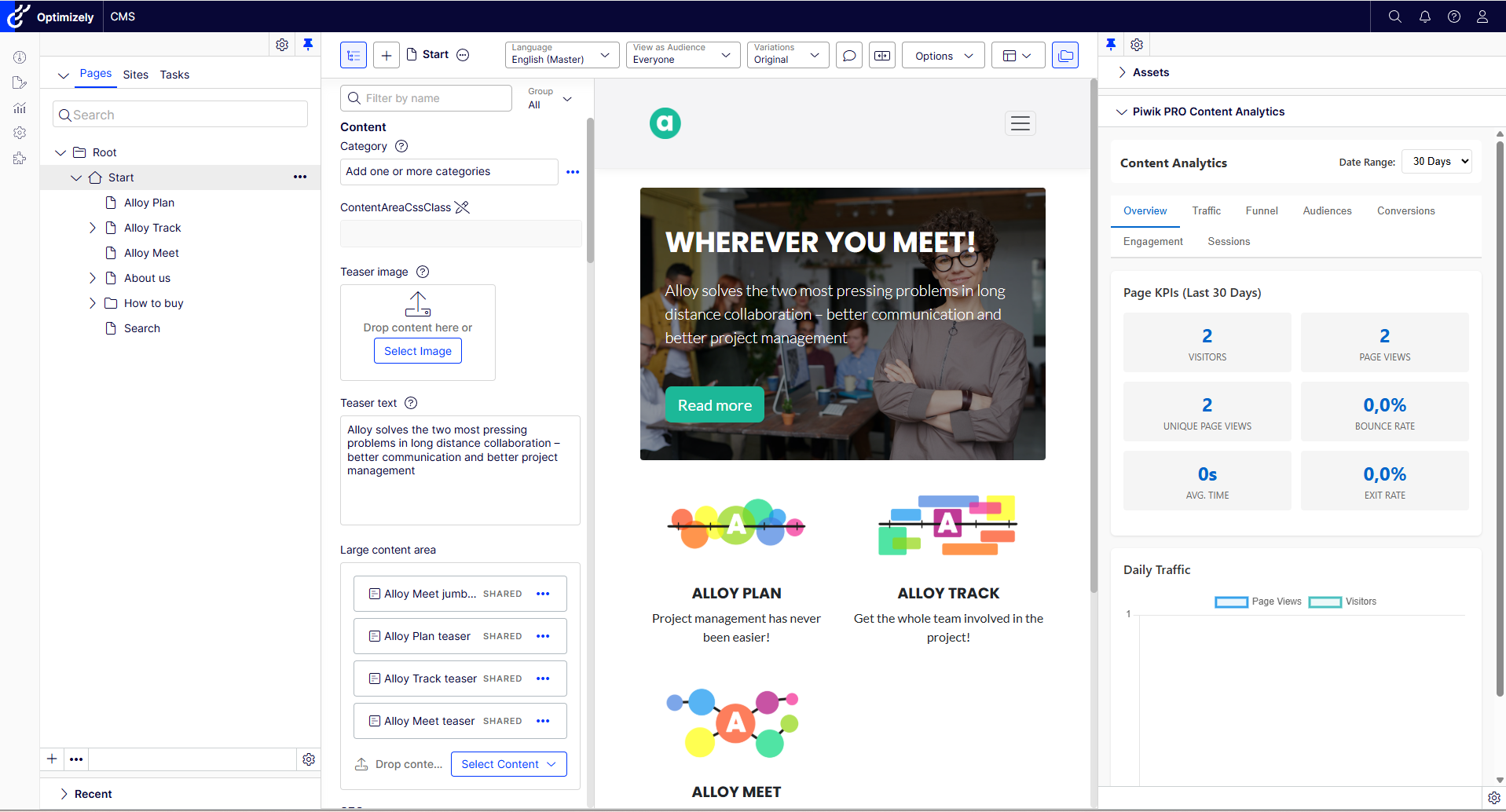
- A Content Analytics widget in the assets pane — per-page and per-block KPIs, traffic sources, funnels, audiences, conversions, and session logs. Right next to the content. Where they belong.
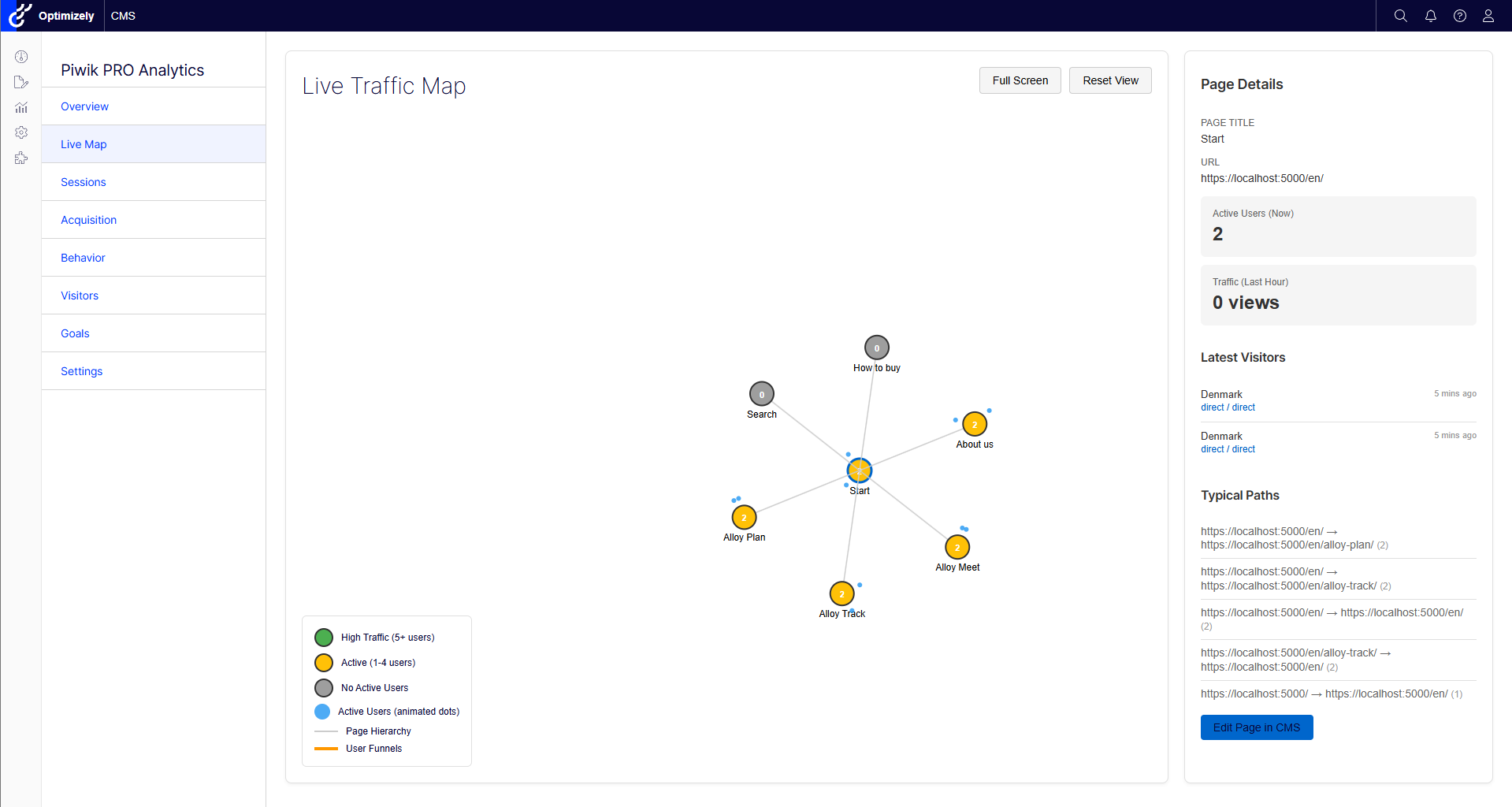
- A Live Traffic Map built on D3 — a force-directed graph of your page hierarchy with real-time traffic indicators. Yes, it is as satisfying to watch as it sounds.
- Per-page goal tracking — editors pick a Piwik PRO goal from a dropdown and it fires when that page is viewed. No code change, no deployment.
- Visitor-group / audience tracking — Optimizely Visitor Group membership flows into Piwik PRO as events or custom dimensions (CMS 12 today; CMS 13 support is on the way — more on that in a sec).
- Multi-site support — map each Optimizely site to its own Piwik PRO app from a settings page in the CMS.
- Localized UI in 11 languages — English, Swedish, Norwegian, Danish, Finnish, German, French, Spanish, Dutch, Japanese, and Chinese (Simplified). Because we're Scandinavian and we couldn't help ourselves.
The Content Analytics widget — the part editors actually use
Every analytics tool in the world has a dashboard. Honestly, most of them have several. The thing editors usually want, though, is much smaller:
"How is the page I'm currently looking at doing?"
That's the question the Content Analytics widget answers, sitting calmly in the assets pane while you edit. Six tabs: Overview, Traffic, Funnel, Audiences, Conversions, Sessions — covering KPIs, where the traffic came from, where it went next, who the visitors were, what they converted on, and a session log if you want to go full forensic.
For blocks and other non-page content, the numbers are aggregated across every page that references the block. So you can finally answer "is this CTA actually pulling its weight on the homepage and the campaign landing page?" without writing a query.
Page views with actual context (a.k.a. "the tracking story")
This is the bit I'm probably most excited about, so settle in.
Most analytics dashboards can tell you that a page was viewed. Cool. The harder questions — the ones marketers and editors actually ask — sound more like:
- "Are our product pages outperforming our knowledge-base articles?"
- "How are pages we published in the last 30 days doing compared to the older ones?"
- "Does the 'High-Value Customer' audience behave differently in the EN site than in the DA site?"
- "Is the product comparison block pulling its weight, regardless of which page it's embedded in?"
Piwik PRO can answer all of those — if every page view arrives at the dashboard already tagged with the right context. The connector's job is to make that tagging much less work than it usually is. Some things it does straight out of the box; others it gives you a couple of lines of code and the right place to put them. Both are a long way from "manually paste a tracking snippet into every layout."
What the connector tags automatically
Once you've wired up services.AddPiwikPRO(...) and provided dimension IDs, the connector adds these signals to every front-end page view, no per-page code needed:
- Content type — the Optimizely content type name (ArticlePage, ProductPage, LandingPage…), so you can finally slice the dashboard by what kind of content something is.
- Content language — the language branch (en, sv, da…), useful the moment you have more than one market.
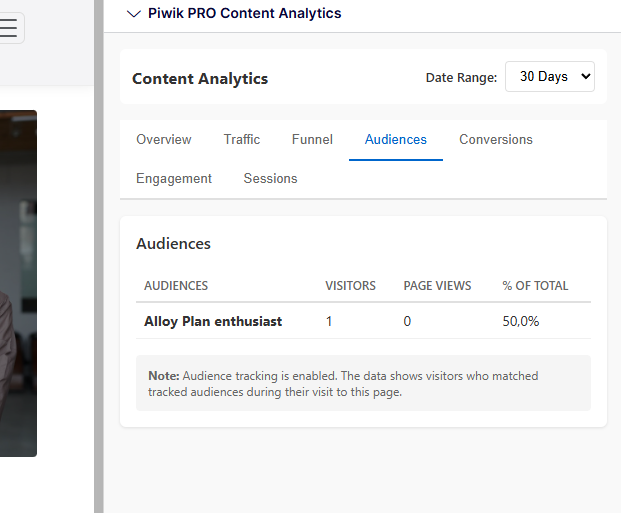
- Visitor group / audience membership — pushed in either as events (trackEvent('Visitor Groups', '<audience>')) or as a comma-joined custom dimension, or both. (CMS 12 today; CMS 13 audience tracking is on the roadmap — see the dual-targeting section.)
- Content block impressions — flag blocks with data-track-content and turn on TrackContentBlocks, and Piwik PRO starts reporting impressions and interactions per block, aggregated across every page that embeds it.
- Per-page goal — assigned by an editor in the Content Analytics widget; fires trackGoal(<uuid>) whenever that page is viewed, no deployment.
That alone covers a surprising chunk of the questions above. But it's "automatic" in the "plumbing-is-done-for-you" sense, not the "magic, no setup needed" sense — you still need to create the dimensions in Piwik PRO and point the connector at them. (The docs walk through that.)
What's worth tracking — and why
The fun starts when you treat custom dimensions as a small backlog of "things I wish my analytics knew about my site." Some of these the connector covers natively; others are five lines of IPiwikProTrackingService.SetCustomDimension(...) in a layout file or a controller. All of them turn vague reports into ones you can actually act on.
Some ideas, in roughly the order I'd reach for them on a real project:
- Content age (publish or last-changed date). Stop guessing whether your fresh content is outperforming your evergreen content — and notice the moment a high-traffic page is silently going stale. Easy to push from a base layout: SetCustomDimension(id, page.StartPublish?.ToString("yyyy-MM-dd")).
- Content section / channel. "How is the Support section doing vs the Blog?" is a different question than "how is page X doing." A one-liner that walks up to the first ancestor under the start page lets you slice everything by site area.
- Categories or tags. If your editors are already tagging content (and most are), surfacing those tags in analytics turns "what topics convert?" from a six-week project into a filter dropdown.
- CMS context mode (Default / Edit / Preview / ProjectPreview). Editor traffic is already excluded from tracking, but pushing the mode as a dimension makes it trivial to prove that to a sceptical stakeholder.
- Authenticated state (logged in / out). Often the single most powerful segmentation lever, and it costs you one line.
- Domain-specific context. SKU, product category, price band, search query, form step, campaign code, plan tier — anything your CMS/app already knows that would make a report 10× more useful. This is where you get to be opinionated.
A reasonable mental model: the connector handles the generic Optimizely-shaped signals; IPiwikProTrackingService lets you push your domain-specific ones. Both render through the same pipeline at the end of the request, so they show up side-by-side in Piwik PRO.
Audiences — the underrated part
I want to single this one out. Optimizely Visitor Groups are powerful, but they tend to live in a personalisation silo: editors use them to swap blocks around, and then nobody analytical ever sees them again. The connector pulls audience membership out of that silo and into Piwik PRO — as events, as a dimension, or both. From the moment the connector is wired up, every page view knows which audiences the visitor matched. That's the data shape that makes "did the campaign land with the right segment?" answerable in three clicks instead of three weeks.
IPiwikProTrackingService — the API for everything else
For the signals the connector can't infer on its own, there's IPiwikProTrackingService: a scoped, per-request service you can inject anywhere you've got DI — controller, view, view component, middleware, tag helper. Calls accumulate during the request and get rendered as a single inline <script> block by the <piwikpro-tracking /> tag helper at render time.
@inject IPiwikProTrackingService PiwikTracking

@{
    PiwikTracking.TrackEvent("Downloads", "PDF", "Product Brochure");
    PiwikTracking.TrackGoal("a1b2c3d4-e5f6-7890-abcd-ef1234567890");
    PiwikTracking.SetCustomDimension(12, Model.CurrentPage.Category?.Name ?? "uncategorised");
    PiwikTracking.AddAudience("Returning Visitors");
}
SetCustomDimension also has factory overloads, so you can defer the work until render time and pass a lambda that gets HttpContext and the current IContent:
PiwikTracking.SetCustomDimension(12, (http, content) =>
    content is ProductPage p ? p.Category?.Name : null);
If the lambda returns null or empty, nothing is emitted — so it's safe to wire up in a base layout and let it no-op on pages where the dimension doesn't apply. Which is, I admit, the kind of API that makes me forget I'm just doing analytics. Don't tell anyone.
Privacy-first, on purpose
Here's the bit that's easy to skim past, but it's basically why we built this on Piwik PRO in the first place.
The web-tracking landscape has changed. Browsers block third-party cookies. Consent banners actually have to mean something now. GDPR has teeth. Most analytics setups respond to that by capturing less data — third-party scripts get stripped out, tracking IDs lose their context, and the dashboards quietly degrade. That's the "incomplete data, flawed decisions" problem in a sentence.
Piwik PRO is built the other way around: privacy-first by design, with consent management baked in (now even more so, since Cookie Information merged with Piwik PRO), flexible hosting (including EU and on-prem), and full control over what gets stored and for how long. It's analytics you can defend in a DPA review.
Which means all the rich tracking I've been talking about isn't a workaround of privacy rules — it's what becomes possible because you're tracking first-party data on a platform designed for compliant analytics. You can learn how visitors actually use your site, which content is working, and which audiences are converting, without asking them to give up their privacy in the process.
A couple of practical guardrails to keep that on the rails:
- TrackLoggedInUserAsUserId is false by default — and stays that way until you've talked to your DPO. Sending an authenticated CMS user's identity to your analytics is usually personally identifiable, and that decision belongs with someone with a job title that includes the word "data".
- Be careful with author / editor names. If you push CMS usernames into a dimension via SetCustomDimension, you're pushing PII. Useful internally, but treat it with the same care.
- Editor sessions are excluded automatically — requests in CMS Edit/Preview mode and under /episerver/ never hit the tracker, so editors don't pollute their own reports.
- Dimensions are opt-in. Nothing tracks unless you configure it. The connector won't sneak data into Piwik PRO behind your back.
Want a Piwik PRO instance to point this at? Grab a free trial here → — it's the simplest way to test the connector against real data without touching procurement.
Blast from the past - remember Live Monitor?
If you have been around Optimizely (EPiServer) as long as I have, you might remember a popular add-on from ages ago called LiveMonitor? It was state-of-the-art (at the time) Flash (and later Silverlight) that showed visitors on the site right now. As a little fun surprise we included similar functionality here - with a live view of what is going on, on your site!
The dual-targeting trick: one package, two CMS generations
Here's the bit I'm most quietly proud of.
Optimizely is in the middle of a generational shift. CMS 12 is alive and well on .NET 8. CMS 13 has just landed on .NET 10. Most of you are running one. Some of you are running both, in different solutions, on different mornings.
Rather than ship two separate packages (which would have been the easy life), the connector is built as a single dual-targeted NuGet with both lib/net8.0/ and lib/net10.0/ inside. NuGet picks the right one for your project's target framework. The install command is identical:
dotnet add package PiwikPRO.Optimizely.Connector
Same package. Same configuration. Same dashboards. Whether your csproj says net8.0 and depends on EPiServer.CMS 12.x, or net10.0 and depends on EPiServer.CMS 13.x, you get the same connector wired to the same APIs. The only behavioral asterisk is audience / Visitor Group tracking, which is currently a no-op on CMS 13 while we wait for the new visitor-group pipeline to settle. The settings are still accepted — they just don't emit anything on CMS 13 yet. Every other feature (events, goals, custom dimensions, content-block impressions, the dashboards, the widget, the live map, multi-site) works on both.
This matters because it lets the connector actually keep up with where the Optimizely platform is going, instead of forking into two semi-maintained packages. One repo, one release cadence, one set of changelogs to read.
Getting started
It's a NuGet package — dotnet add package PiwikPRO.Optimizely.Connector and you're off. The full setup walkthrough, configuration reference, and troubleshooting tips live in the docs repo:
👉 github.com/CodeArtDK/piwikpro-optimizely-docs
Don't have a Piwik PRO account yet? You can grab a free trial here — easiest way to test the connector against real data.
A few things worth flagging
Because nothing in software is ever entirely free of small print:
- CDN dependency. The admin views currently pull Chart.js and D3 from cdn.jsdelivr.net (with SRI integrity hashes). If your CSP doesn't whitelist it, the charts will silently refuse to draw themselves. Bundling locally is on the roadmap; in the meantime, allow https://cdn.jsdelivr.net in script-src.
- PII / GDPR. TrackLoggedInUserAsUserId is false by default for a reason. If you flip it on, you're sending the authenticated CMS user's identity to Piwik PRO, which is usually personally identifiable. Talk to your DPO before you ship that one.
- CMS 13 audiences. Currently a no-op, as mentioned above. Coming back as soon as the pipeline allows.
Why this matters more than "another integration"
For organisations that have spent years quietly removing tracking because the legal team kept asking pointed questions, the combination of Optimizely + Piwik PRO is a meaningful shift. You get analytics that's good and defensible — first-party, EU-friendly, consent-aware, with full control over retention — running inside the CMS your editors already use, with the rich content metadata Optimizely already knows about flowing into the dashboards automatically.
That's the loop the connector is trying to close: respect users, capture the data you can legitimately capture, and finally be able to make decisions on something more solid than "I think the homepage is fine?"
If you want to dig deeper into that bigger picture — how to tell which decisions your current data is actually capable of supporting, and where the gaps are — that's the topic of the masterclass on Wednesday. I'd love to see you there.
What's next
Beyond filling in the CMS 13 audience gap, here's what we're already poking at:
- 🔌 Bundling the dashboard's chart libraries locally (so CSP-strict environments stop having a quiet existential crisis).
- 🤖 Tighter ties to Opalytics — letting you ask analytics questions from inside the CMS instead of clicking through pages. (If you missed Opalytics, the original post is here and the under-the-hood deep dive is here.)
- 🧪 More built-in dashboards based on what people actually ask for. So if you spin up the connector and immediately think "the one thing I really want is X" — please tell us. That's how the good features happen.
Try it now
It really is just one dotnet add package away. Install it on a dev environment, point it at a free Piwik PRO trial, and have a poke around the dashboard. Wire up a couple of dimension IDs and watch the page-views report turn into something you'd actually use. If you find a bug, want a feature, or just want to send a screenshot of your live traffic map looking unreasonably cool at 2 a.m. — open an issue on the docs repo, or drop us a line via contact.
And if you're nodding along to the "incomplete data" framing and want the bigger conversation — join us at the Piwik PRO masterclass on Wednesday, May 6. I'll be talking about exactly this kind of CMS-side tracking and what it lets marketing teams actually decide.
Privacy-first analytics. Inside the CMS. On both CMS generations. From the same NuGet.
That tab in your browser? You can finally close it.